

How to find and download Landsat data.
- Travis Simmons
- Jan 8, 2023
- 2 min read

Updated: Jan 8, 2023
Hello and Welcome to the GLOBE-INDEX blog!
Finding and downloading Landsat data is easy.
Finding the Data:
1. Head to the link below and create an account.
2. After you create your account, login. You will be greeted with the page below.

We are now ready to find our Landsat data!
3. Finding the region you are looking to download data for.
This region is often called your ROI or Region of Interest, and you have a few options to select it. You can:
Use the map by dragging and zooming to your ROI and then clicking 'Polygon' in the left panel, and then clicking 'Use Map'. This will give you all of the Landsat data that overlaps the region you are looking at on the map.
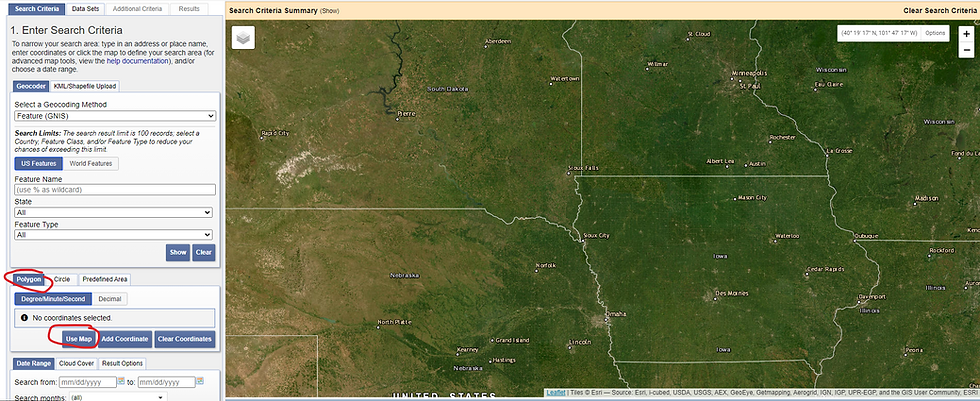
You can manually type in corner coordinates by selecting 'Polygon' in the left panel and then clicking the 'Add Coordinate' button.
You can pull all of the data for a US county or state by selecting 'Predefined Area' and then 'Add Shape' and following the prompts. (circled in red)

3. Choose what data in your ROI you want to pull.
Select a date range (circled in blue in the picture above).
Click 'Data Sets'
Click 'Landsat'

4. Select your 'Level' and 'Satellite'

If you are looking for raw, but corrected data with labeled bands then you want Collection 3 Level-2!
4. Click the check box next to what Landsat you want data from.
5. Click results at the bottom of the page

Each Item in the list is called a Scene, and is one Landsat data collection.
4. Congrats you have found your data!
Downloading the Data:
There are a few ways you can do this!
Manually by clicking the icon in red, and then either downloading all of the bands using the buttons in blue or downloading each band using the buttons in orange.

Or if you want to download all of the scenes, you can use the USGS Bulk Download Application. Which will be covered in another post!
Thank you for reading
Travis Simmons
Software Engineer
GLOBE-INDEX
Comments